.png)
An Example Scenario
Today, if we change the owner of an application, a Jira admin has to edit multiple Automation rules to keep routing correct. This is slow and error‑prone.
By moving those mappings into Lookup Manager’s lookup project and using the Update Issue Field post function, a process owner can update one row in one table. All workflows will immediately route to the new owner, without touching Automation rules.
We get one source of truth, fewer complex rules, and more predictable behaviour.
The Problem with using only Jira Automation
Today we use Jira Automation rules to derive and populate fields like:
-
Assignee, approvers, or managers based on project, application, or issue type
-
Priority, issue security, groups to notify based on certain combinations of fields
-
Customer or staff details inferred from a user, email domain, or internal codes
While this works, it has some drawbacks:
-
Logic is buried inside many rules
-
Each project or scenario tends to have its own rule.
-
When an ownership or routing change is needed, someone has to find all relevant rules and update them individually.
-
Over time, this leads to inconsistent behaviour.
-
-
Rules become complex and fragile
-
Complex IF/ELSE branches, smart values, and JSON editing are often needed to handle slightly different cases.
-
This makes troubleshooting difficult for admins who are not Automation experts.
-
-
Automation quotas and performance
-
Every lookup done in Automation consumes rule executions.
-
On busy instances, this can contribute to hitting limits or delayed execution.
-
-
Hard for business owners to maintain
-
Business teams usually understand ownership in terms of a mapping table (like Excel), not conditional logic in rules.
-
They cannot easily verify or update mappings themselves.
-
What Lookup Manager’s “Update Issue Field” offers
Lookup Manager is designed precisely for this scenario. It behaves like Excel’s VLOOKUP inside Jira.
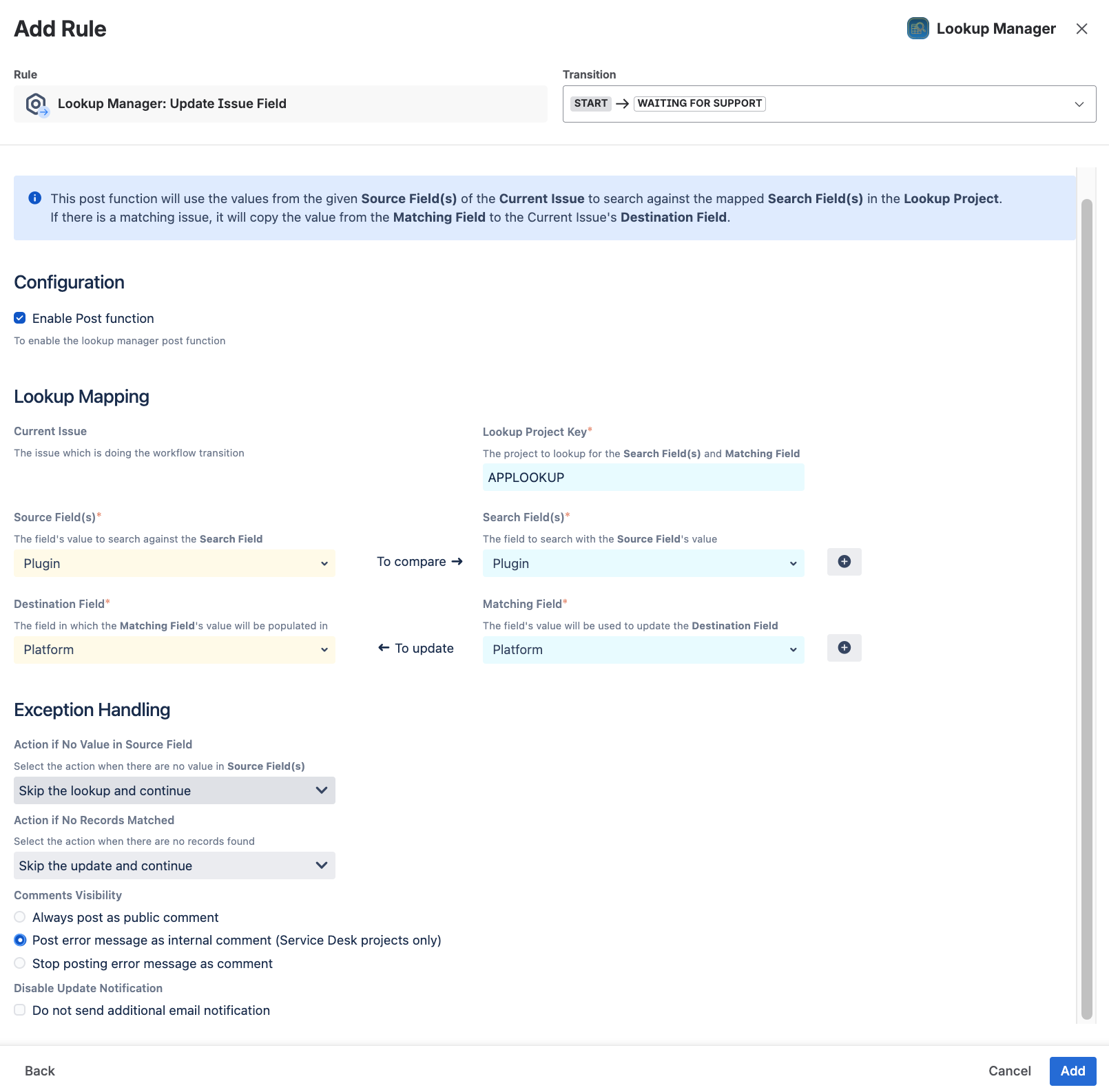
Using its Update Issue Field post function, we can:
-
Store mappings centrally in a Jira project
-
Example: an “Application Lookup” project where each issue is one row:
-
Plugin → Product Owner, Platform, Hosting
-
-
Example: a “Project Inventory” project:
-
Project Key → Project Manager, Cost Centre
-
-
-
Perform lookups during workflow transitions
-
Configure the workflow to run Lookup Manager: Update Issue Field on transitions such as Create, Approve, or Move to In Progress.
-
The post function:
-
Reads one or more Source Fields from the issue
-
Searches the Search Field(s) in the lookup project
-
Returns the Matched Field value
-
Writes it into the Destination Field on the current issue
-
With configurable behaviour if there’s no value or no match (skip, default value, etc.)
-
-
-
Support multi-column matching
-
You can match on multiple fields (e.g. Issue Type + Application) rather than building complex nested conditions in Automation rules.
-
-
Point‑in‑time mapping
-
The mapping is resolved at the transition.
-
If you later change the lookup table, historical issues are not retroactively changed, which is often what auditors and process owners expect.
-
On Jira Cloud, the “Update Issue Field” post function even supports updating custom fields that are not on the screen, thanks to the app’s elevated permissions (from version 1.3.0 onwards).
Why replace (or reduce) Jira Automation lookups with Lookup Manager?
-
Centralised configuration
Instead of embedding logic across different Automation rules, Lookup Manager uses:
-
One lookup project (or a small number of them) to hold the mappings
-
Workflow post functions that are identical across projects or issue types
Updates become simple data maintenance:
-
To change who approves Application X, just edit the corresponding issue in the lookup project.
-
No rule changes, no rule deployments, no risk of missing one project’s rule.
-
Simpler, more transparent logic
-
Anyone who can read a table can understand how the routing works.
-
Governance is easier: an auditor or manager can inspect the lookup project and see all mappings in one place.
-
More robust execution
-
The lookup is part of the workflow transition itself, not dependent on a separate async rule.
-
This reduces timing and sequencing issues (e.g. multiple rules competing to update the same field).
-
Reduced Automation complexity and cost
-
Jira Automation remains for orchestration (when to run, notifications, escalations), not for core lookup logic.
-
Fewer conditions and branches in rules.
-
Lower risk of hitting Automation execution limits.
-
Better fit for business-managed mappings
-
Business owners can own and maintain the mapping data (in Jira issues) while Jira admins keep control of workflows.
-
This splits responsibilities cleanly:
-
IT/Jira admin: configure workflows & post functions
-
Business/process owner: maintain who is responsible for what in the lookup tables
-
Rovo Generated Content
The content from this page is generated from Atlassian Rovo and enhanced by human for better readability