.png)
Exceptions
The following exceptions are available to handle specific scenarios for File Type Blocking.
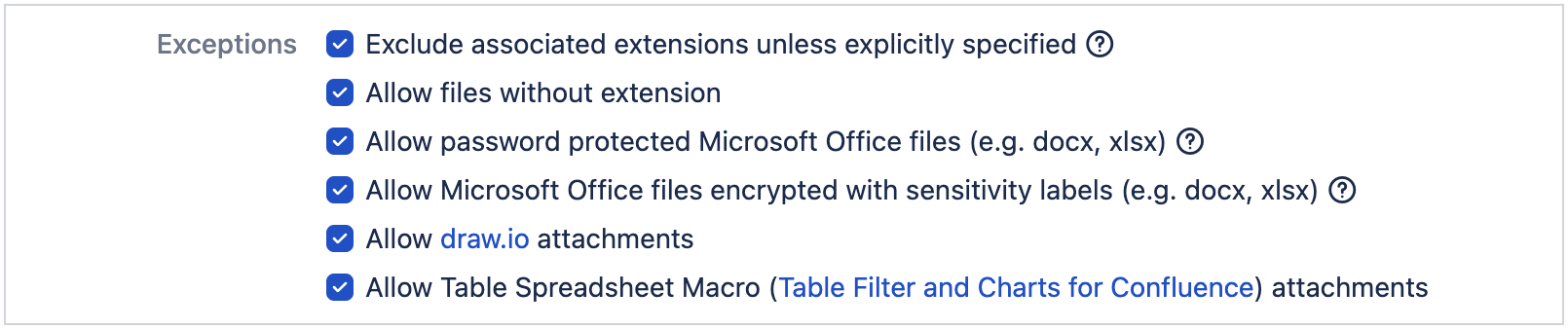
Exclude associated extensions unless explicitly specified
This is only applicable for Allowlist filter mode.
When an extension is added to the allowlist, all associated extensions are automatically included in the allowlist.
To exclude associated extensions, please enable this exception.
Allow files without extensions
To allow upload of files without extension, please enable this exception.
Allow password protected Microsoft Office files
This applies to the following extensions:
docx, dotx, xlsx, xlsb, xlsm, xltm, pptx, thmx, potx, ppsx, pptm, potm, ppsm
To allow upload of password protected MS Office files, please enable this exception.
Allow Microsoft Office files encrypted with sensitivity labels
This applies to the following extensions:
docx, dotx, xlsx, xlsb, xlsm, xltm, pptx, thmx, potx, ppsx, pptm, potm, ppsm
To allow upload of encrypted MS Office files, please enable this exception.
Allow draw.io attachments
To allow the upload of attachments auto generated when creating draw.io diagrams, please enable this exception.
Allow Table Spreadsheet Macro (Table Filter and Charts for Confluence) attachments
To allow the upload of attachments auto generated when using Table Spreadsheet Macro, please enable this exception.