.png)
Overview
The Enhanced Issue Filter Gadget allows users to retrieve and visualize Jira issues through Filters or JQL in a flexible table format
Interactive features and export capabilities make it easier to analyze, share, and report on issue data.
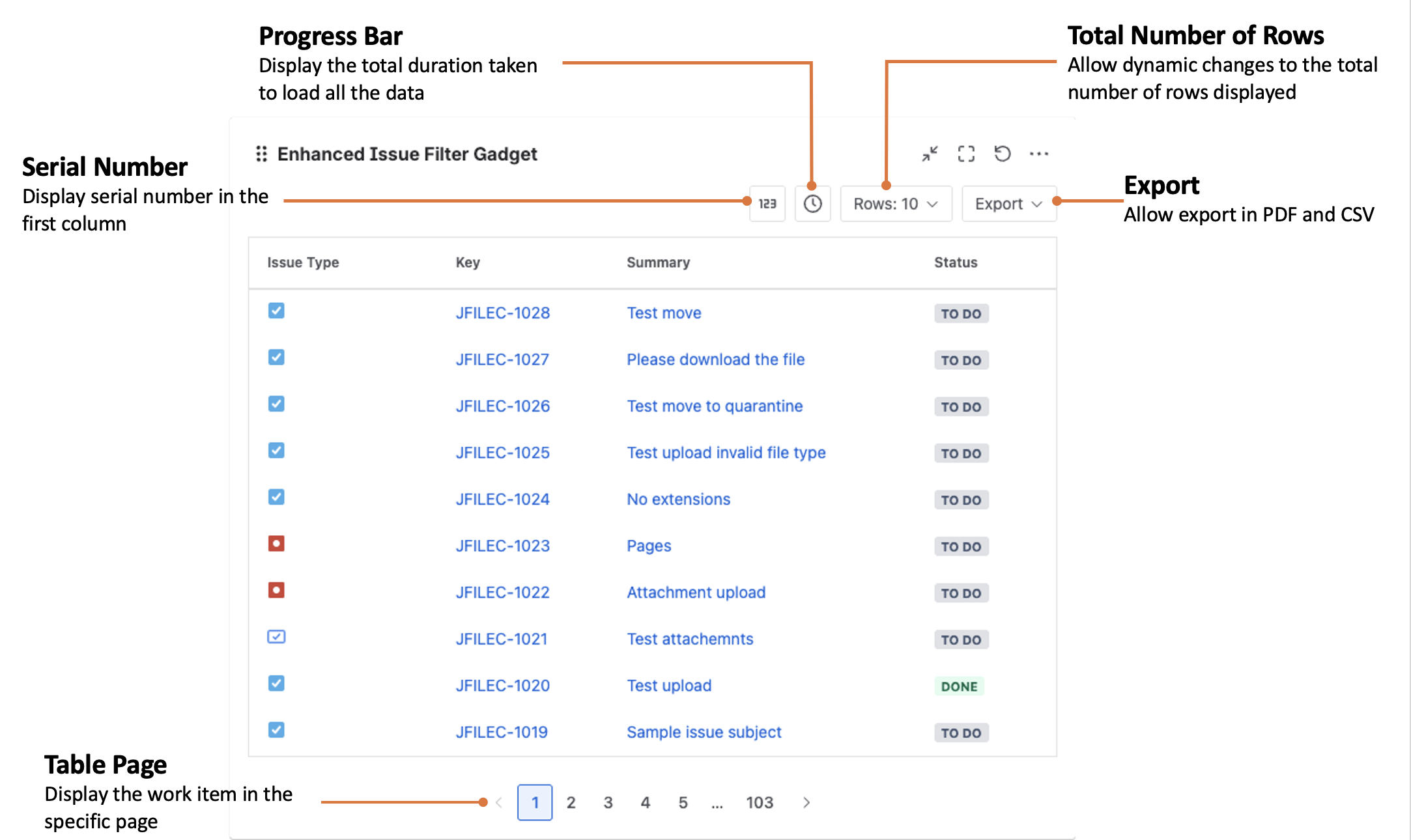
Different Table Options
There are 4 different action buttons you can press
|
Desired outcome |
Action |
|---|---|
|
See table rows with the respective number for easy reference during discussions |
Clicking on this button 
|
|
Information on how long it took to fetch the results |
Click on this button 
|
|
Increase the total number of rows seen in table (e.g. 500) |
Click on the rows button 
|
|
Export filtered results to CSV or PDF |
Click on the export button 
|
Possible use cases
The Enhanced Issue Filter will be handy for scenarios like
-
Downloading the filtered data into a CSV for further analysis
-
Create reusable reporting views without needing manual data extraction
-
Overview of work items in a tabular format
-
Ability to drill in individual work items base on the filtered results
Can be used together with Dashboard Review Gadget for discussion with your team