.png)
Enterprise Jira instances can accumulate millions of attachments with active usage. Without proper visibility and controls, attachment growth can increase storage costs, slow down administration, create compliance risks, and make migrations or clean-up exercises harder to manage.
Akeles provides 3 Jira Data Center apps that work together to help administrators understand, control, and maintain attachment usage:
-
Attachment Checker for Jira — prevents risky, oversized, or non-compliant files from being uploaded.
-
Attachment Housekeeper for Jira — identifies and removes obsolete or unnecessary attachments.
-
Site Statistics for Jira — provides reporting and analytics to understand attachment growth and storage usage across the Jira site.
Why attachment management matters in enterprise Jira
In large Jira environments, attachments are often created by many teams over many years. Common challenges include:
-
Rapid storage growth caused by screenshots, logs, exports, videos, and repeated file uploads.
-
Lack of visibility into which projects, issues, or users contribute most to attachment storage.
-
Security and compliance concerns when confidential, executable, or unsupported file types are uploaded.
-
Outdated attachments that remain long after they are useful.
-
Operational impact during backups, migrations, audits, and performance troubleshooting.
A strong attachment management strategy should combine prevention, clean-up, and reporting.
Attachment Checker for Jira
Attachment Checker for Jira helps administrators enforce attachment upload rules before files enter Jira. It is useful when organizations need to reduce risk and keep attachment content aligned with internal policies.
Typical uses
-
Block restricted file extensions or file types.
-
Prevent uploads that exceed configured size limits.
-
Warn users before they upload files that may not comply with company policy.
-
Reduce unnecessary storage growth by discouraging large or unsuitable attachments.
-
Support governance requirements for regulated or security-sensitive environments.
-
Perform virus scanning on files
How it helps attachment management
Attachment Checker acts as the first line of defence. By controlling what can be uploaded, Jira administrators can prevent avoidable storage growth and reduce the chance of risky files being stored in the instance. It can reduce the occurrences of missing attachments by providing feedback to end users when virus scanners remove the infected files from the backend.
Attachment Housekeeper for Jira
Attachment Housekeeper for Jira allows admins to define flexible housekeeping policies to scan and clean up unwanted attachments. It preserves the context by keeping a record on the details of the removed attachments within the issue view. There is a safety retention period where users can flag out files to recover before they are permanently deleted.
To make it feasible for large scale usage, project admins can
-
override the housekeeping policy
-
view reports
-
bulk recover marked attachments during the retention period
It is especially valuable for mature Jira sites where attachment storage has grown over time.
Typical uses
-
Compliance to regulations like GDPR
-
Remove attachments that are no longer required
-
Prepare Jira instances for migration, archiving, or storage optimisation.
-
Support periodic housekeeping routines for long-running enterprise Jira sites.
How it helps attachment management
Attachment Housekeeper provides the clean-up capability needed after attachments are not longer needed. It helps teams reduce storage consumption, remove clutter, and maintain a healthier Jira environment over time. As a security best practice, data minimisation helps to reduce liability and impact of a data breach.
You cannot leak data you no longer have. Reducing your data footprint directly reduces your attack surface.
Site Statistics for Jira
Site Statistics for Jira gives administrators visibility into Jira usage patterns, including attachment-related statistics. The free app helps teams make informed decisions based on data instead of assumptions.
Typical uses
-
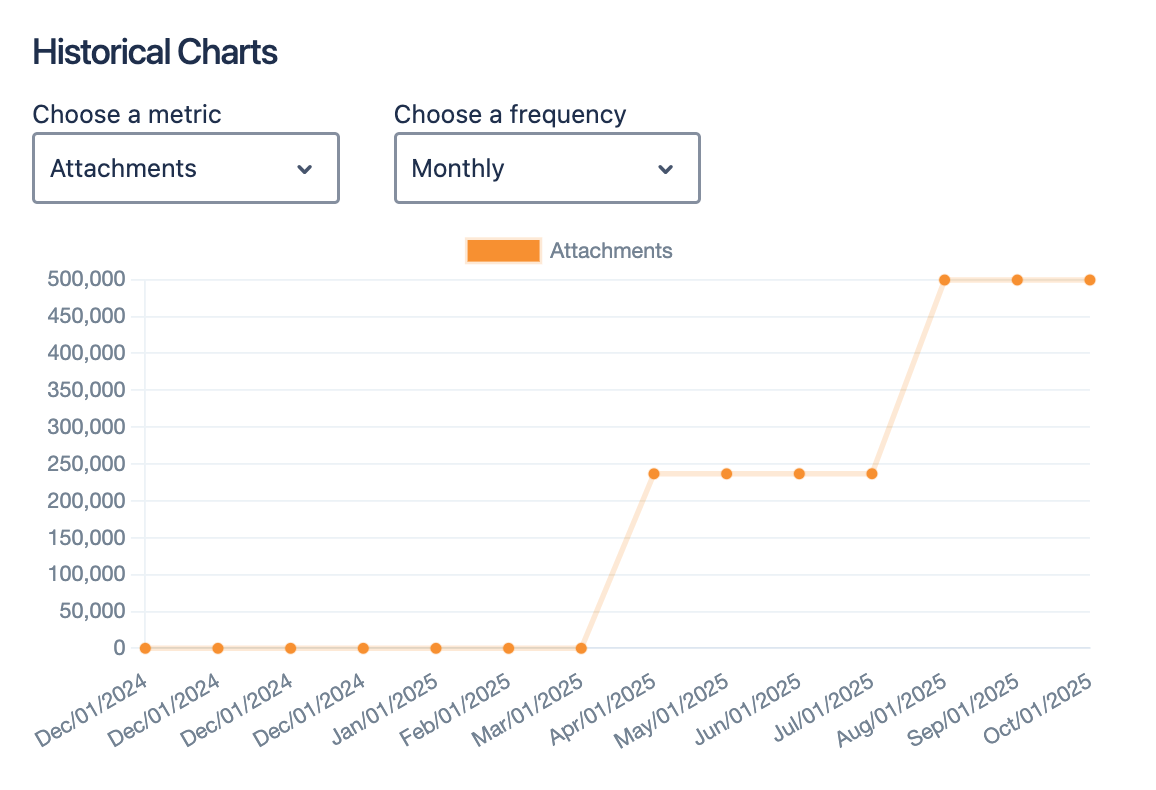
Collect attachment storage trends across the Jira site.
-
Track growth patterns over time.
-
Support capacity planning, governance reviews, and management reporting.
-
Provide evidence for targeted clean-up or policy changes.
How it helps attachment management
Site Statistics provides the reporting layer. It helps administrators understand where attachment growth is happening, measure the impact of clean-up efforts, and justify policy changes using objective data.
How the three apps work together
|
Your Need |
Recommended App |
Outcome |
|---|---|---|
|
Prevent unsuitable files from being uploaded |
Attachment Checker for Jira |
Reduces risk and controls future attachment growth. |
|
Clean up existing attachment storage |
Attachment Housekeeper for Jira |
Removes obsolete or unnecessary files. |
|
Understand attachment usage and trends |
Site Statistics for Jira |
Provides visibility for planning, reporting, and governance. |
Together, these 3 apps support a complete attachment lifecycle approach:
-
Measure attachment usage with Site Statistics for Jira.
-
Clean up existing attachment data with Attachment Housekeeper for Jira.
-
Control future uploads with Attachment Checker for Jira.
-
Review regularly to ensure attachment policies remain effective as Jira usage grows.
Used together, they improve governance, reduce storage waste, and support a more maintainable Jira environment.
Recommended enterprise approach
-
Start with reporting to understand the current attachment footprint.
-
Prioritise high-growth projects or projects with large attachment volumes.
-
Define attachment policies for size, file type, and retention.
-
Run controlled housekeeping activities with stakeholder review.
-
Use upload checks to prevent the same issues from recurring.
-
Schedule regular reviews and clean-up cycles.