.png)
You can create a bookmarket with the Javascript to load the original source Confluence page from a Scroll Sites page
What is a Bookmarklet
From Wikipedia
A bookmarklet is a bookmark stored in a web browser that contains JavaScript commands that add new features to the browser. They are stored as the URL of a bookmark in a web browser or as a hyperlink on a web page. Bookmarklets are usually small snippets of JavaScript executed when a user clicks on them. When clicked, bookmarklets can perform a wide variety of operations, such as running a search query from selected text or extracting data from a table.
Setup Instructions
-
Right click on the bookmark bar in the browser. If it is hidden, you can choose “Always show Bookmarks Bar” from the View menu
-
Choose Add Page… option
-
Name the bookmark (e.g. Scroll ➡ Confluence)
-
Copy and paste the JavaScript in the URL.
javascript:(() => { window.location = scrollHelpCenter.source.confluenceBaseUrl + "/pages/viewpage.action?pageId=" + document.querySelector("html").getAttribute("data-vp-page-id"); })() -
Make sure you choose the Bookmarks bar so that it is easily accessible
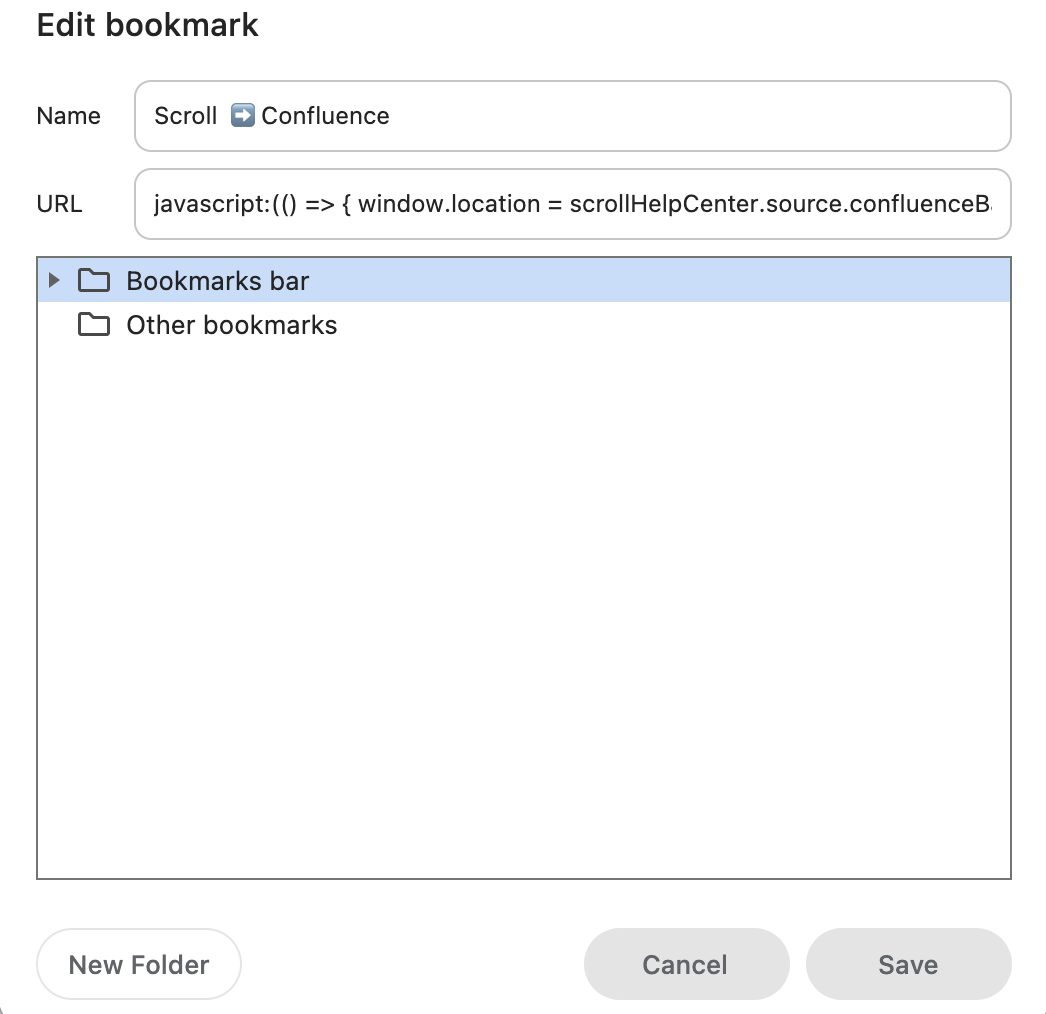
-
Press Save.
How to use
-
Go to a Scroll Viewport page (e.g. https://akeles.jira.com/wiki/display/JFILEC)
-
Click on the bookmarket

-
You will be redirected to the source Confluence page